What Shows
Menus, specials, promotions, events, weather, and entertainment in your venue's own branded channel.
Ads Extreme TV by Fred’s Web
Give your venue its own branded TV channel for menus, specials, promotions, events, weather, and entertainment. Fred prepares your branding and initial content; you keep menus, prices, specials, and events current from your computer or phone.
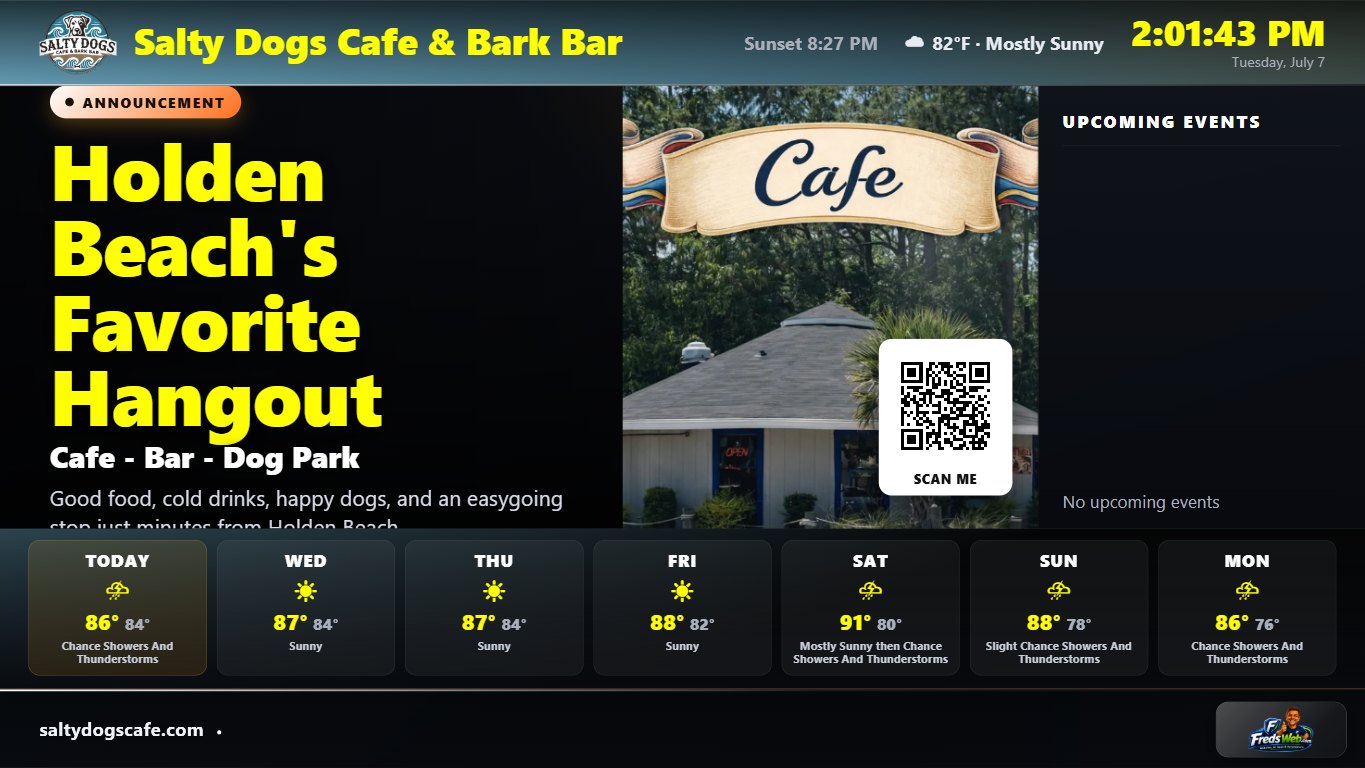
Actual live TV-app screenshot from a running venue screen. Open your venue's TV link in a compatible TV browser or connected device; Fred confirms the equipment needed before setup.
Built for venues
Bars, restaurants, breweries, taprooms, beach bars, sports bars, music venues, clubs, and entertainment businesses can use the screens customers already stare at.
Menus, specials, promotions, events, weather, and entertainment in your venue's own branded channel.
Open your venue's TV link on a compatible TV browser or connected device. Update information and choose what appears from your phone or computer.
Fred prepares the channel, branding, menus, specials, and promotions so your screens feel like your venue from the start.
Ads Extreme TV
One venue subscription. Up to five TVs. Your own branded channel.
$149 one-time setup$99/month
Hardware is not included. Fred checks your existing TVs and confirms any compatible connected device needed before setup. Cancellation timing, access, content, and hardware details are confirmed in writing. The Managed Website's 12-month commitment does not apply to this venue TV package.
Ask About A Venue Setup View current AdsExtreme.com pricing & detailsStraight answers
Ads Extreme TV is an established venue service with a working channel, private dashboard, content management, and remote support. Fred explains the setup clearly and keeps the service focused on useful information and promotions.
Your existing TVs and an internet connection. Fred checks compatibility and confirms any connected device needed before setup. Hardware is separate and is not included in the subscription or setup price.
Fred handles the initial branding and content setup. After that, you update menus, prices, specials, and events from your computer or phone.
There is no long-term contract for the venue TV package. Cancellation timing, access, content, and hardware details are confirmed in writing before setup.
This service shows your promotions on your venue's TVs. It does not buy advertising or manage social ad campaigns.
Ads Extreme TV
Tell Fred about the venue, the screens you have, and what customers should see on them. He'll reply with the setup that makes sense.
Fred's AI website assistant
Fred-approved answers
Automated assistant. Fred-approved answers only.